Jump to content
View in the app

A better way to browse. Learn more.

PDS Geosciences Node Community

A full-screen app on your home screen with push notifications, badges and more.

To install this app on iOS and iPadOS
  1. Tap the Share icon in Safari
  2. Scroll the menu and tap Add to Home Screen.
  3. Tap Add in the top-right corner.
To install this app on Android
  1. Tap the 3-dot menu (⋮) in the top-right corner of the browser.
  2. Tap Add to Home screen or Install app.
  3. Confirm by tapping Install.
  • Search By Tags

    Search will match any tag entered
  • Search By Author

Content Type

Forums

  • PDS Geosciences Node
    • Announcements
    • For data providers
    • For data users
  • PDS Geo Tools
    • Analyst's Notebook
    • ODE - Orbital Data Explorer
    • Spectral Library
  • Workshops
    • MRO/CRISM Data Users' Workshop 2012

Categories

  • Data user tools

Blogs

  • Working with PDS data
  • Using the Analyst's Notebook

Find results in

Find results that contain...

Date Created

  • Start

    End

Last Updated

  • Start

    End


Filter by number of...

  • Minimum number of comments

  • Minimum number of replies

  • Minimum number of reviews

  • Minimum number of views

Found 2 results

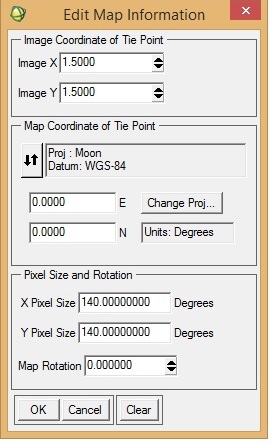
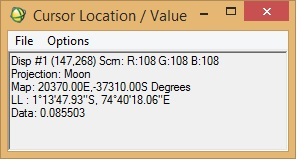
  1. I want to georeference an M3 image (obtained via PDS) in ENVI. I was following "Assigning Map Information to PDS Images in ENVI", posted by Dr June Wang. I was able to perform most of the steps. Yet when the process is complete, it seems that the georeferencing is not correct. I have attached a couple of screenshots from the M3 image I was working with. To check the accuracy of georeferencing, I cross-checked the location from Google Moon and found that there are a lot of discrepancies between the 'georeferenced' M3 image and Google Moon. In the 'Edit Map Information' window, I entered X-pixel and Y-pixel sizes as 140. Please let me know if this is correct. When I cross-checked with Google Moon, the top of the image should have latitude as north and the bottom the image as south (also verified from LOC file of the M3 image). Please help.
  2. Hi! I want to compare spectra generated from M3 with RELAB library spectra (62231, Apollo 16 landing site soil sample) using ENVI. One specific issue is, spectral library from RELAB (62231) has 451 bands, whereas M3 has 86 spectral bands. This is apparently creating a mismatch and is not allowing me to compare the two spectra. Please help!

Configure browser push notifications

Chrome (Android)
  1. Tap the lock icon next to the address bar.
  2. Tap Permissions → Notifications.
  3. Adjust your preference.
Chrome (Desktop)
  1. Click the padlock icon in the address bar.
  2. Select Site settings.
  3. Find Notifications and adjust your preference.